Debugging
The debug machinery itself, getDebugger, the DebugController and how namespaces are enabled, lives in @mnaoumov/typescript-lib and is described in its Debugging guide. This page covers what a plugin built on this library adds to it.
Showing debug messages in Obsidian
Section titled “Showing debug messages in Obsidian”By default, console debug messages are not shown. To enable them you have to enable Verbose mode in the console settings.
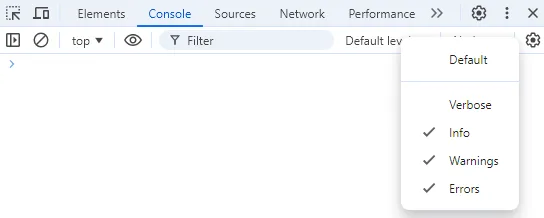
When you enable Verbose mode, you will see debug messages in the console sent via console.debug() calls.
By default, none of the debug messages are shown. You have to enable the debug namespace explicitly.
To see debug messages for your plugin alpha-bravo, you have to enable them by running the corresponding command in the console:
window.DEBUG.enable('alpha-bravo'); // show all debug messages from the `alpha-bravo` pluginwindow.DEBUG.enable('alpha-bravo:obsidian-dev-utils:*'); // show all debug messages from this library within the `alpha-bravo` pluginwindow.DEBUG.enable('alpha-bravo:*'); // show all debug messages from the `alpha-bravo` plugin and its submoduleswindow.DEBUG.enable('*:obsidian-dev-utils:*'); // show all debug messages for this library within any pluginwindow.DEBUG.enable('*'); // show all debug messagesThe library’s own messages use the namespace obsidian-dev-utils, not obsidian-lib. That is the name of the retired package this library replaced. It is kept so that a filter you enabled for an older plugin, or one still built on obsidian-dev-utils, keeps working.
See full documentation of window.DEBUG.
To write debug messages from your plugin, call consoleDebug() on the plugin’s consoleDebugComponent. PluginBase creates that component for you and logs through it under your plugin’s id:
import { PluginBase } from '@mnaoumov/obsidian-lib/plugin/plugin';
export class AlphaBravoPlugin extends PluginBase {  protected override async onloadImpl(): Promise<void> {    await super.onloadImpl();    this.consoleDebugComponent.consoleDebug('alpha', 'bravo', 'charlie');  }}
The member is protected, so call it from inside your plugin class.
Advanced Debug Mode
Section titled “Advanced Debug Mode”You can use Advanced Debug Mode plugin to configure debug namespaces via Settings UI.
Cancelling a runaway operation
Section titled “Cancelling a runaway operation”A vault-wide operation that turns out to be slower, or wronger, than expected can be aborted from the console:
globalThis[Symbol.for('@mnaoumov/typescript-lib/state')].values.sharedAbortController.value.abort();This aborts the app-wide shared abort signal, so every operation currently observing it stops. The controller is the one getSharedAbortController() returns. Every plugin built on this library shares it, so the call cancels whichever operation is running.
The signal is replaced immediately after the abort, which means the next operation starts with a fresh one and the call above works as many times as you press it. A plain AbortController would stay aborted forever after the first call.
For this to cancel anything, the operation has to be observing that signal in the first place. From plugin code, pass it wherever an abortSignal is accepted — most usefully to loop():
import { getSharedAbortSignal } from '@mnaoumov/typescript-lib/abort-controller';import { loop } from '@mnaoumov/obsidian-lib/loop';import { PluginBase } from '@mnaoumov/obsidian-lib/plugin/plugin';
export class AlphaBravoPlugin extends PluginBase {  private async processAllNotes(): Promise<void> {    await loop({      abortSignal: getSharedAbortSignal(),      buildNoticeMessage: ({ item, iterationString }) => `Processing ${iterationString} - ${item.path}`,      items: this.app.vault.getMarkdownFiles(),      pluginNoticeComponent: this.pluginNoticeComponent,      processItem: async (file) => {        await processFile(file);      }    });  }}
Call getSharedAbortSignal() at the start of each operation rather than caching it, or the operation after the first abort starts already aborted.