Hi folks
Today I’ve discovered an issue which I would like to share.
We had a Task Scheduler task which runs cmd, and that cmd runs robocopy to backup some files to the network drive.
I’ve been asked to investigate why it is not working and not showing any errors.
According to the TaskScheduler event log: task completes within with event type 201
Task Scheduler successfully completed task "\Mytask" , instance "{b35cde71-a3d3-46fc-9ee7-be66e54a5636}" , action "C:\Windows\SYSTEM32\cmd.exe" with return code 0.After some head scratches I found the root cause
Firstly, it started to work when I enabled Run only when user is logged on
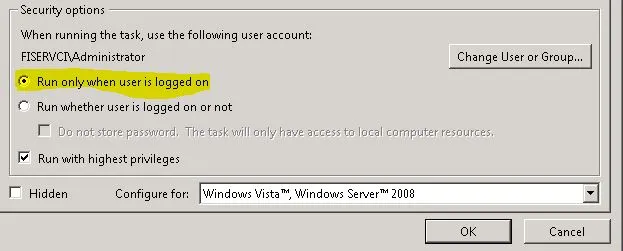
Previously it was Run whether user is logged on or not
The drawback of the second mode is that the running process windows are hidden so we cannot see what is going on.
And after some googling I found that in this mode none of mapped drives will work
And here is the solution for that
http://modmaven.wordpress.com/2009/05/27/how-to-make-windows-7-map-your-network-drives-properly/
Set-ItemProperty -Path Registry::HKEY_LOCAL_MACHINE\SOFTWARE\Microsoft\Windows\CurrentVersion\Policies\System -Name EnableLinkedConnection -Value 1 -Type DWord