Hi folks!
I am a big hater of pull merges, i.e. commit with messages like Merge branch ‘mybranch’ of http://my-url:repo into mybranch
It normally appears after git pull in scenario when you made some commits in your local branch, and someone else made some commits in his version of local branch then he pushed it into remote repo.
git pull is just a shortcut for the following two commands
git fetch origin mybranch git merge origin/mybranchSecond command gives the name pull merges to this process.
So what’s wrong with that? Why I hate it?
The answer is simple - it complicates the git history making it non-linear without a real need.
In my ideal world branches are linear as much as possible and only necessary no-ff merges appear between different branches.
But these bloody pull merges make everything worse
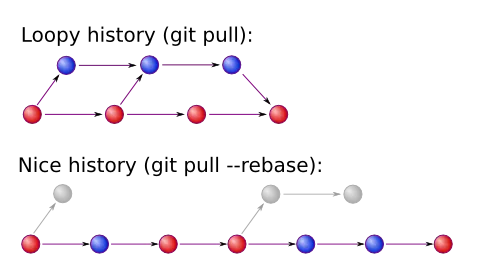
I will guide you with some solutions
Step 1. Pull —rebase
Yay, pull —rebase command does the thing, instead of merge it performs a rebase. I don’t want to go deeper into details, I assume you all know what rebase is. But briefly saying, it takes your commits you made locally and reapplies them on top of the commits from the remote repo, so it preserves linearity of the branch.
Step 2. Make Pull —rebase a Default Behavior
I don’t need default pull behavior, so I want to have —rebase flag all the time.
There is a solution for that
git config branch.mybranch.rebase trueVoila! Now if I just type pull on mybranch it will perform pull —rebase
This procedure should be done for all desired existing branches manually.
What about newly created branches? What if I want this setting to be set for them automatically?
Easy
git config branch.autosetuprebase alwaysIn case if we suddenly want to have a default pull we can use
git pull --no-rebaseStep 3. Fix Problem with Merges
Unfortunately, pull —rebase have a shortcoming. It destroys merges.
if you do
git merge someotherbranch git pull --rebaseYou will see that your merge disappeared. Well, not fully disappeared, commits from someotherbranch are in place, but they are look like cherry-picked ones, and link between merged branches disappeared.
In such cases I used to follow two approaches.
If merge was easy to do, not many conflicts, and I know what I am doing, I could start merge again
git fetch git reset --hard origin/mybranch git merge someotherbranchIn case if merge was difficult, or some other reason, I had to use this hateful pull —no-rebase
But! Recently I’ve discovered another right way to do that.
Instead of pull —rebase I do
git fetch git rebase origin/mybranch --preserve-mergesand it reapplies your merges
you can use -p flag instead
Git Extensions has corresponding checkbox as well.
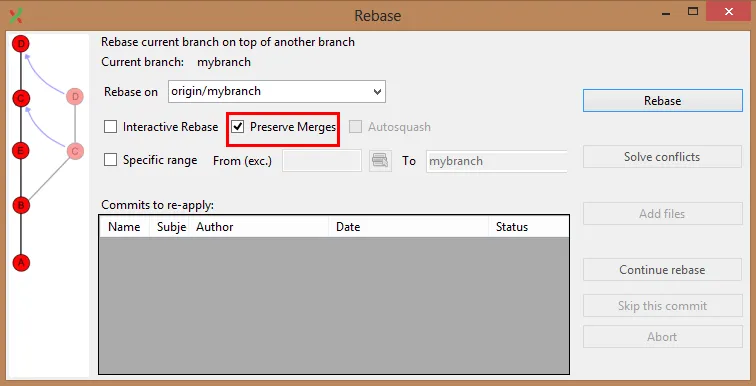
Step 4. Merge Conflicts
Well, —preserve-merges has another shortcoming. When it reapplies merges you have to solve the same merge conflicts over and over.
It can be annoying to do this. You want to fix a conflict once, and then keep the resolution even during rebases.
The solution for this is rerere. It stands for Reuse recorded resolution of conflicted merges
It is doing exactly what we needed. We just need to enable it once. Then as soon as we fixed a merge conflict, it records what the conflict was and how did you fix it. Then when it sees the same conflict, I takes your resolution and uses it. It is extremely handy.
Don’t waste your time. Go and enable it right now!
git config rerere.enabled trueIt is very useful not only in a context of the rebases.
Ok now, we are done.
Hope I made your life easier :)
Stay tuned!