By default T4 runtime template adds to the project corresponding generated cs file 
But what if we want to have some custom logic in separate C# file? We create a partial class and put that logic there. But default project structure is not very friendly with that. How would we name this file? Where would we put it?
I think the best approach to handle such case was shown us by ASP.NET WebForms 
I want to have something similar to that 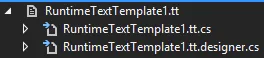
Unfortunately we cannot do it from Visual Studio and we have to edit our csproj file manually and add the following snippet there
<ItemGroup>
  <None Include="[PATH]\[TemplateName].tt">
    <Generator>TextTemplatingFilePreprocessor</Generator>
    <LastGenOutput>[TemplateName].tt.designer.cs</LastGenOutput>
  </None>
  <Compile Include="[PATH]\[TemplateName].tt.designer.cs">
    <AutoGen>True</AutoGen>
    <DesignTime>True</DesignTime>
    <DependentUpon>[TemplateName].tt</DependentUpon>
  </Compile>
  <Compile Include="[PATH]\[TemplateName].tt.cs">
    <SubType>Code</SubType>
    <DependentUpon>[TemplateName].tt</DependentUpon>
  </Compile>
</ItemGroup>
I used this approach a lot and eventually I ended up creating an add-in for VisualStudio which creates such project structure